Essay Grader Upgrade: Criteria Breakdown and Structured Feedback Buckets
By Per Thoresson
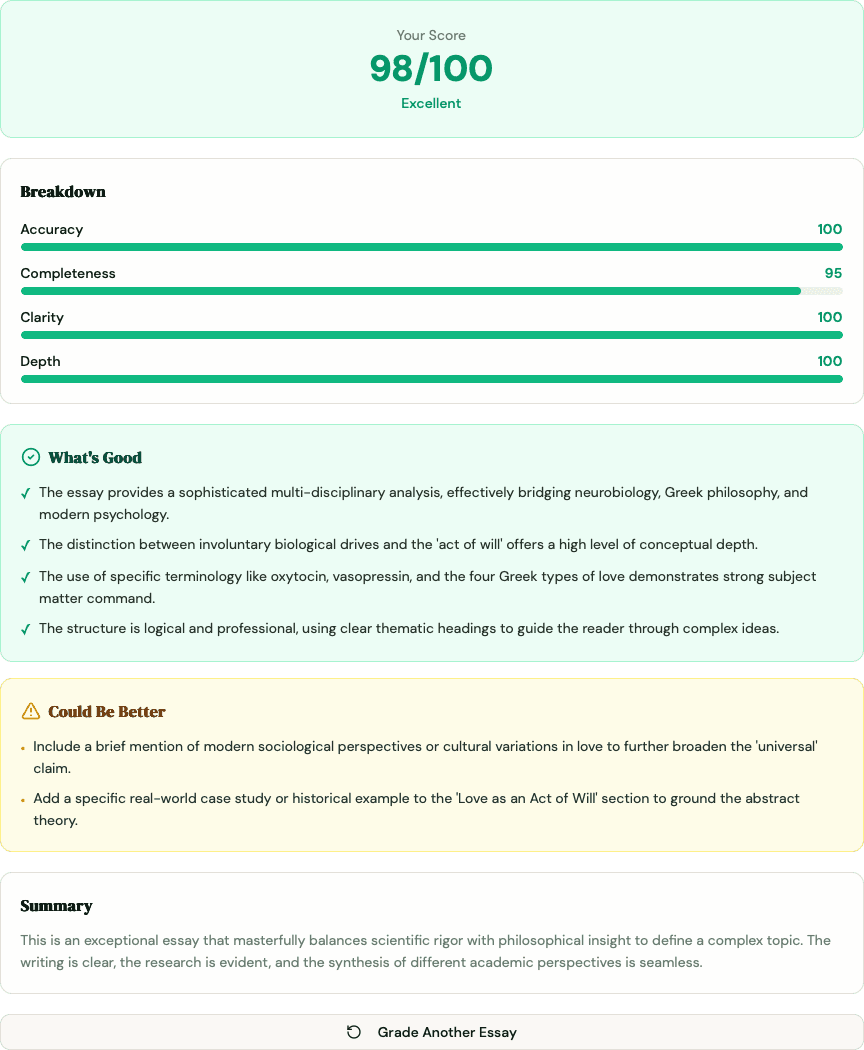
A score of 74 tells you one thing: you didn't pass with flying colors. It tells you nothing about whether your thesis was solid, whether you missed half the prompt, or whether a single factual error dragged you down. Without that breakdown, revision is guesswork.
The AI essay grader at MoreExams now shows exactly where that 74 came from - and what to fix first.
Key Takeaways
- The essay grader now returns a criteria breakdown: four color-coded progress bars (Accuracy, Completeness, Clarity, Depth) so you can see which dimension cost you points
- Three structured feedback buckets replace the single prose paragraph: What's Good, Could Be Better, and Needs Fixing - each with 2-5 specific bullet points
- Colors follow a simple signal: green (80+), yellow (60-79), red (below 60)
- The overall "Feedback" field is now a 1-2 sentence summary; all actionable detail lives in the buckets
- The landing page preview now shows the new format so you can see it before submitting an essay
- Research consistently shows structured, specific feedback produces stronger learning gains than scores alone - Hattie and Timperley (2007) put the effect size at 0.73
What Is the Essay Grader Criteria Breakdown?
The criteria breakdown is a set of four color-coded progress bars that show your score on each of the rubric dimensions separately. Instead of one composite number, you see how you performed on Accuracy, Completeness, Clarity, and Depth individually. Each bar turns green (80 or above), yellow (60-79), or red (below 60), so you know at a glance which areas are strong and which need work.
For the full explanation of how each criterion is weighted and what it measures, see the free AI essay grader. The short version: Accuracy carries 40% of your score, Completeness 30%, Clarity 20%, and Depth 10%.
What Changed: Before and After
Previously, the grader returned a score from 0-100 and one paragraph of prose feedback. That paragraph had to do everything - acknowledge strengths, flag errors, and suggest improvements - in a single block of text. Students either skimmed it or got lost in it.
Here's what the same submission returns now:
| Before | After | |
|---|---|---|
| Score display | Single number | Score hero + four criteria bars |
| Feedback format | One prose paragraph | 1-2 sentence summary + three labeled buckets |
| Specificity | Mixed into prose | Separate cards per feedback type |
| Visual signal | None | Color-coded bars and cards |
| Actionability | Varies | Concrete bullets ("Add a topic sentence to paragraph 2") |
The prose paragraph became the summary. The detail moved into structured buckets you can act on one at a time.
How to Read the Criteria Breakdown
Each bar represents one dimension of your essay. The color tells you the urgency.
- Green (80+) - This area is solid. Protect it when you revise - don't accidentally weaken what's working.
- Yellow (60-79) - Room to improve, but not a crisis. These are often the highest-value targets for a quick score boost.
- Red (below 60) - This is where points are leaking. Tackle red bars before anything else.
A common pattern: Accuracy is green, Completeness is red. That usually means you understood the material but didn't address the full scope of the prompt - a fixable problem once you can see it clearly.
Another common pattern: Clarity is yellow, Depth is red. You organized your thoughts reasonably well but stayed at surface level. The Depth criterion is weighted only 10%, so a red bar there hurts less than a red Accuracy bar - but the color still flags it as worth addressing.
Reading the bars in combination gives you a more useful picture than any single number can.
The Three Feedback Buckets Explained
Each bucket is a color-coded card with bullet-point items. They're designed to be read in order - but not acted on in order.
What's Good (green card)
Specific things you did well. Not hollow encouragement like "good effort" - concrete observations like "your thesis directly addresses the prompt and appears in the opening paragraph" or "you correctly applied the IRAC framework to both issues."
Read this bucket first and read it carefully. Students often revise away their strongest elements because a score of 74 makes everything feel like a problem. Knowing what's working tells you what to leave alone.
Could Be Better (yellow card)
Concrete, actionable improvement suggestions. The prompt used to generate these specifies 2-5 specific bullets - not "improve structure" but "your second paragraph introduces a new claim without a topic sentence; one sentence connecting it to your thesis would fix this."
These are your revision targets. Work through them after you've handled anything in Needs Fixing.
Needs Fixing (red card)
Factual errors, missing key points, and serious structural problems. If the prompt asked you to analyze two theories and you only analyzed one, that appears here. If you used a term incorrectly in a way that undermines your argument, that's here too.
Prioritize this bucket regardless of what the bars say. A factual error in an essay scored mostly green is still a factual error - and fixing it will move your Accuracy bar.
A Practical Revision Workflow
Getting the feedback is step one. Here's a sequence that makes it usable.
- Read What's Good first. Set a mental note of what not to touch.
- Work through Needs Fixing. Look up anything you got factually wrong. Fix missing sections of the prompt before touching style.
- Move to Could Be Better. Take each bullet as a discrete edit. Don't try to address everything at once - one paragraph, one transition, one piece of evidence at a time.
- Check the criteria bars again. They tell you which dimension the bullet belongs to. If three bullets are all about Completeness, they're all pointing at the same underlying gap.
- Resubmit and compare. Paste your revised draft back into the essay grader. The score movement from draft one to draft two is more informative than either score alone.
This is the same iterative loop built into the free AI essay grader - the new UI makes it faster because you no longer have to parse what type of feedback each sentence is.
Why Structured Feedback Produces Better Learning Outcomes
A score is a verdict. Structured feedback is a map. The research on which one helps you improve is fairly settled.
Hattie and Timperley's 2007 meta-analysis in the Review of Educational Research found feedback has an effect size of 0.73 on academic achievement - one of the highest of any instructional intervention. But the effect size applies to feedback that answers three questions: Where am I going? How am I going? Where do I go next? A raw score answers the second question partially and the other two not at all.
A 2021 review by Wisniewski, Zierer, and Hattie in Frontiers in Psychology found that the most effective feedback is specific and task-focused - it targets the work, not the person, and it tells the student exactly what to do differently. Effect sizes for that type of feedback were significantly higher than for general praise or unstructured written comments.
The three-bucket structure maps directly onto those findings. What's Good tells you what's working. Could Be Better and Needs Fixing tell you specifically what to change and in what direction. The criteria bars tell you which dimension matters most.
This doesn't make AI feedback a replacement for a professor's comments. A human grader catches discipline-specific nuance, argumentative sophistication, and field conventions that no rubric fully encodes. But for the practice loop - the 11 PM revision before a deadline - structured AI feedback with task-specific bullets outperforms both a bare score and a paragraph of mixed prose.
Structured Feedback vs. Other Feedback Methods
| Feedback Method | Speed | Always Available | Criteria-Specific | Task-Level Bullets | Human Nuance |
|---|---|---|---|---|---|
| New structured breakdown | 15-30 sec | Yes | Yes | Yes | No |
| Previous score + prose | 15-30 sec | Yes | No | Sometimes | No |
| Professor comments | Days | No | Varies | Varies | Yes - highest |
| Peer review | Hours | No | Rarely | Rarely | Partial |
| Grammar tools | Instant | Yes | No (style only) | Style fixes only | No |
Professor feedback remains the standard for high-stakes work - see the Pro grader post for where AI grading fits in assessed exam contexts. The structured breakdown is optimized for the practice loop: fast, consistent, and specific enough to act on before a deadline.
Frequently Asked Questions
What is the criteria breakdown in the essay grader?
The criteria breakdown shows your score on four rubric dimensions separately - Accuracy (40%), Completeness (30%), Clarity (20%), and Depth (10%) - as color-coded progress bars. Green means 80 or above, yellow means 60-79, and red means below 60. It tells you which dimension cost you points, not just what your composite score is.
What are the three feedback buckets?
The three feedback buckets are labeled What's Good, Could Be Better, and Needs Fixing. Each is a color-coded card containing 2-5 specific bullet points. What's Good acknowledges concrete strengths. Could Be Better provides actionable improvement suggestions. Needs Fixing flags factual errors, missing content, and serious problems that need to be addressed before anything else.
How is this different from the feedback the essay grader gave before?
Previously the grader returned a score and one paragraph of prose feedback. That paragraph mixed acknowledgments, gaps, and suggestions together without separating them. The new format splits the same information into labeled buckets with specific bullets, adds a visual criteria breakdown, and reduces the prose summary to 1-2 sentences. The same underlying AI grades the essay; the output is structured differently.
Which feedback bucket should I focus on first?
Start with Needs Fixing. Factual errors and missing key points affect your Accuracy and Completeness scores - the two highest-weighted criteria. Once you've addressed those, move to Could Be Better for structural and clarity improvements. Read What's Good first so you know what not to change during revision.
Does the color of a bar tell me how much it affects my score?
The color tells you the severity within that criterion - green is strong, red is weak. It doesn't directly tell you the weighting. Accuracy (40%) and Completeness (30%) have the most impact on your composite score. A red bar on Depth (10%) matters, but a red bar on Accuracy matters four times as much. Use the bars in combination: a red Accuracy bar plus a yellow Completeness bar is a more serious problem than a red Depth bar alone.
Can I still see a single overall score?
Yes. The score hero still shows your 0-100 composite score prominently. The criteria breakdown is additional information displayed below it - the overall score hasn't gone anywhere.
Does this change apply to the free essay grader and the Pro version?
The structured feedback format applies to the free essay grader. The grader used inside MoreExams Pro exams and practice mode has also been updated with the same output format.
You've always been able to get a score from the essay grader. Now you can see exactly why you got it - and what to fix before you submit. Paste your draft, read the buckets in order, and revise against the red bars first. If your Accuracy bar is consistently red across drafts, that's usually a knowledge gap, not a writing problem - pair the grader with active recall study sessions to build the understanding the essay needs. Then test whether you know the material deeply enough to write about it from another angle with a practice quiz.
For a deeper look at how the four criteria are defined, try the free AI essay grader. For how the grader fits into assessed exam workflows, see the smart essay grading post.